Organizing sounds for the gig: Keyboard internal or iPad?
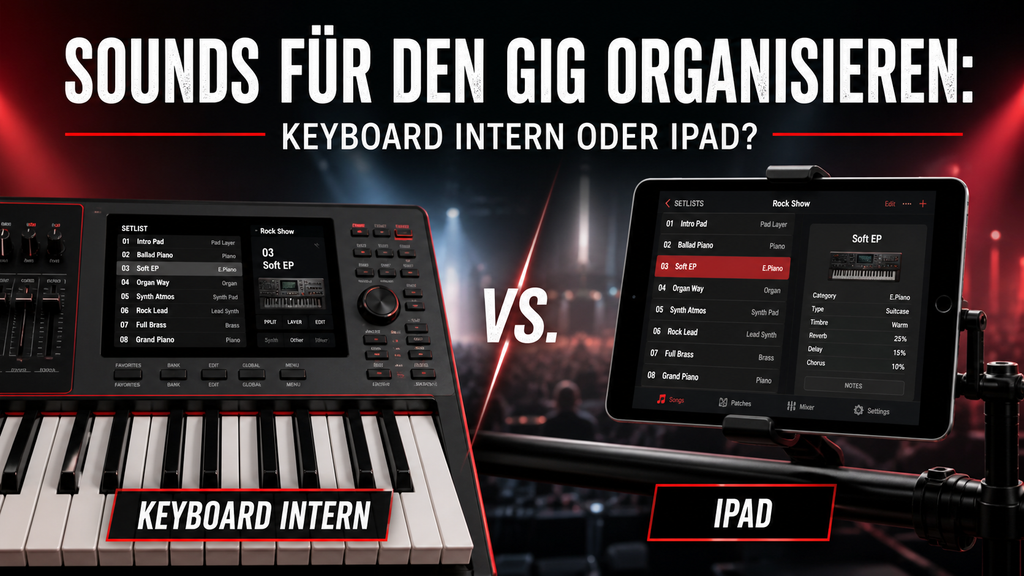
Both methods work – the question is, which one suits you better.
Every Keyboardist Knows This Problem
The soundcheck is running, the band is already in tune, and you're still scrolling through 80 presets because you can't remember which sound for "Superstition" is next to the one for "Don't Stop Believin'". Or vice versa: you've prepared everything perfectly – but your iPad is at home.
Organizing sounds for rehearsals and gigs is an underestimated challenge. It's not just about what sounds you have – but how quickly you can get to the right sound at the right moment. And without distraction, without searching, without stress.
Fundamentally, there are two ways: you organize everything directly on the keyboard – or you get support from an iPad with a setlist or band management app. Both approaches have real advantages, but also clear weaknesses. This article will help you find the right path for your situation.
Method 1: Everything on the Keyboard
Most modern workstation keyboards offer internal organization options: Live Sets, Performance Memories, User Banks, or similar structures. The principle is always the same – you group your sounds by gig, band, or setlist and recall them at the push of a button. If you don't have a fixed order, you can simply sort your patches alphabetically – which may sound unspectacular, but often works better in practice than any other structure.
The biggest advantage: You don't need any additional equipment. Everything is on the keyboard, everything is "offline-safe," and you already know how to operate it. No battery, no app that behaves differently than expected after an update.
The drawback: Keyboards are not built for setlist management. If you quickly need to find a different patch between songs or spontaneously change the order, it becomes fiddly. Notes or song information directly on the display? Only a few devices currently offer this – it's possible with the Korg Kronos and Nautilus, but not with the rest. And those who play for multiple bands quickly juggle dozens of performance memories that eventually all feel similar.
Method 2: iPad with App
Apps like BandHelper, OnSong, Camelot, ForScore, or SetlistMaker take on the role of a digital tour manager. You create setlists, assign songs, store notes, lyrics, chords, or even patch numbers – and everything is clearly separated for rehearsals and gigs.
Thanks to MIDI, you also have a direct connection for changing sounds: the iPad automatically sends the correct Program Change to the keyboard when the song changes. You don't necessarily need a separate MIDI interface for this – most modern keyboards can be connected directly via USB. If you prefer working wirelessly, opt for the WIDI Master from CME: simply plug it into the MIDI jack, connect via Bluetooth to the iPad, and you're ready to go.
Disadvantage: You bring another device to the stage. It needs to be charged, must not crash, and the initial setup effort is higher. Those who have never used such an app will need a few hours of setup time – but it quickly pays off.
Direct Comparison at a Glance
The table is not a scoreboard – it's a decision-making aid. Which path suits you better depends on which criteria truly matter to you in your daily routine.
|
Criterion |
Keyboard Intern |
iPad/App |
Recommendation |
|
Setup time before gig |
Low – everything in the device |
Low to medium – start iPad, open app |
Keyboard |
|
Reliability |
Very high – no dependencies |
High, but app crashes possible |
Keyboard |
|
Flexibility with setlist changes |
Limited – manually search for patches |
High – setlist via drag & drop |
iPad |
|
Cross-band use |
Only with export/import |
Easy – multiple setlists in one app |
iPad |
|
Learning curve |
Medium – relearn with every change |
Medium – app setup required |
Tie |
|
Dependence on batteries/hardware |
Keyboard power only |
Additional iPad battery needed |
Keyboard |
|
Notes & info per song |
Not possible or barely possible |
Yes – lyrics, sheet music, capo etc. |
iPad |
|
Separate rehearsal vs. gig |
Hardly – often same structure |
Easy – own setlists |
iPad |
|
MIDI Integration |
Direct – no extra device |
Only with MIDI interface (e.g. CME WIDI) |
Keyboard |
Rehearsal is not a gig – and that makes a difference
One point that is often forgotten: How you organize sounds for rehearsal should be different from gig preparation. During rehearsal, you want to jump between songs quickly, even backward in the setlist, and try out variations. At a gig, it usually runs linearly – from song 1 to song 20, with occasional spontaneous changes.
With the keyboard alone, this distinction is hardly possible. An app, however, allows you to create a separate setlist for each band and occasion – rehearsal set, gig set, "Best Of" list for special cases. This is one of the underestimated advantages of the iPad approach.
And of course: It's also possible without an app. Many keyboardists have been successfully playing for years with a clearly structured keyboard and get along just fine. What matters is not the tool, but that you have a system – and maintain it consistently.
My Recommendation
If you play for a band, have a manageable set, and know your keyboard well: Start internally. Learn how your device organizes performances or live sets, and build a clean structure – alphabetically or by setlist order. This is perfectly sufficient for many situations.
An important question here: How flexible do you need to be on stage? Someone playing a fixed setlist from A to Z with a tribute band doesn't need a sophisticated organizational system – the sequence is always the same, and they know the keyboard by heart. However, someone who plays for several bands, frequently changes the order spontaneously, or jumps between different genres will quickly reach the limits with the keyboard alone.
In that case, switching to an iPad is a real relief. The extra effort in setting it up pays off after just a few rehearsals – and the direct MIDI connection to the keyboard makes switching sounds between songs a breeze.
Do you want to go deeper?
How to specifically prepare your keyboard for everyday stage use – creating live sets, structuring sounds, setting up MIDI control – that's precisely the topic of my workshops. Practical, without jargon, directly applicable.
Find out more at keyboard-workshops.de.
-
Posted in
bühne, bühnenmix, Coversound, ipad, Live, live sound, organisieren, setliste, Sound, sound check, Sound Design, Sound Management



Mein Stage Setup,
Mir ist sehr wichtig, dass alles funktioniert in alle Richtungen. Und zwar:
Set List im Keyboard kann auch iPad – Songbook – Pro steuern und umgekehrt.
Ipad – Songbook-Pro kann meine beiden Keyboards (Korg Kronos 3, Korg PA-5x) steuern und sogar auch das Multieffekt von unseren Bassisten (Faule sau).
Sollten alle Stricke reißen dann habe ich immer dabei (Im Auto) KORG Kross 2 und da habe ich meine 15-20 Kombi Sounds – Layer parat die im Notfall super ausreichen und das Publikum merkt überhaupt nichts. Hauptsache es läuft.
Ein Typ im Notfall: Ich habe immer dabei mein MacBook Pro und da habe ich in „MainStage“ meine komplette Sammlung von Layern und Sounds die sofort abrufbar sind. Ich benutze Nektar Panorama P6. Hat hervorragende Tastatur mit Aftertoch und perfekte Integration zur MainStage und anderen DAWs